Showing posts with label Tricks. Show all posts

Saturday, 16 March 2013

Posted by Unknown On 05:49
Friends.Time Stopper is a great software that can enable any kind of trial application for unlimited use. Yes it is possible now with Time stopper software. You can change the time of any .exe trial version and use for ever. I think this will help you all as this is a totally free software. Download and enjoy ……..

timestopper
 
Important features of Time stopper.
1. It will eliminate the short time period of your trial versions. 
2. It will extend your time period of executable files for unlimited time. 
3. It will easily be installed. 
4. It will not damage any file of your operating system. 
5. It is 100% free.


Download Time Stopper free: Click here (Alternate Link)

Friday, 30 March 2012

Posted by Unknown On 05:28

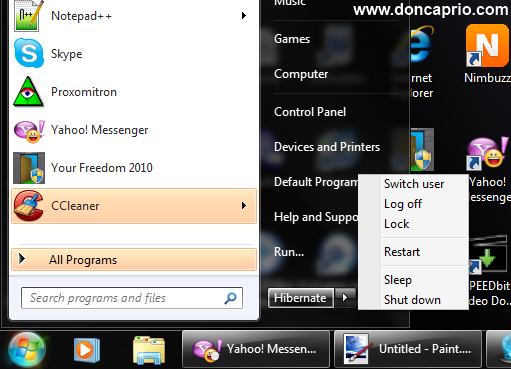
There are lots of people complaining that they have one or two problems with their notebook due to hibernation and that makes one wonder if hibernation actually damages a computer. As a matter of fact, I hate shutting down my laptop because of the time taken to start up and the time taken to restore my browser tabs which may be up to fifteen at times. Hibernating your computer is a very good way to save your work but people often try to convince me that it’s going to damage my motherboard eventually. Is there any truth to this? Is it a practice one should avoid?
First, let me try to tell you what happens when your system goes into hibernation. What most people do not know is that when you hit the hibernation button, your computer actually shuts down but it usually stores a file on your hard disk which is used to restore whatever you’ve been doing.
does hibernation damage your computer?

Tuesday, 17 January 2012

Posted by Unknown On 10:34

  • There are various tools to bypass the windows 7 password.
  • But this trick will show you to change the password  to any windows account then you can change the password without knowing current password.
  How to Change Window 7 Password without Knowing Current Password:

1.      Go to Control Panel and click on the Administrative Tools.
2.      Under this section double click on Computer Management.
3.       Select  System Tools from right window pane.{shown below in screenshot}


Posted by Unknown On 09:51


  1. Gmail is the fastest growing email service and has one of the best Spam filters and also clean interface for navigation. which are not enabled by default but you can activate them from Gmail Labs.
          2.  Email forwarding to mobile phones  is feature which automatically sends email to mobile phone as soon as it arrives in your Inbox.
          3.  This feature is still not supported by Gmail but you can enable it using third party services like way2sms or 160by2.
     
       v  How to receive Gmail Alerts on your phone ?
         Here are steps
Ø  
  • Go and get  registered  at www.way2sms.com.
  • After registration login and click on the Mail Alerts tab in it (Note down your Way2Sms Email Id from here)

  • To your Gmail account-> gmail
  • Click on Open your Mail Settings and then select Forwarding and POP/IMAP tab.
  • Now Click on Add a forwarding address and in the text field enter your way2sms.com’s Email address.

Sunday, 4 December 2011

Posted by Unknown On 03:36
Lots of people upload videos on Facebook daily but you can only play those videos if you have flash player installed, you're not allowed to download them. Sometimes, you probably wish to save some of these videos and watch later but there's no download option on Facebok. There are several ways to download Facebook videos which ranges from using different browser addons to different online services that allows you to freely download Facebook videos. Out of the different methods, I came up with five which I consider the best.


1. Browser Addons


Saturday, 3 December 2011

Posted by Unknown On 10:52

USB SECURITY UTILITIES INTRO :--

ü  Lightweight For maximization of security of data in Removable Disk storage devices eg USB Drives, portable hard drives, memory cards.

ü  This Software manage all things in ONE WINDOW Ã virus scanner+ file backup+suspicious file seeker+ vaccine or device immunization. 

ü  Give USB Security Utilities a try to fully assess its capabilities!


Friday, 2 December 2011

Posted by Unknown On 03:41
It first looked cool and useful when it started out but when it got extremely out of hands, I had to do something. When Facebook introduced smart list, they made it very easy to group your friends according to their importance to you. It also makes it easier to keep track of their facebook activities as you get notified when they post an update or upload a new picture. The downside of the smart list is that you get tons of notifications that's of no use to you. Even without commenting or liking the post, you get notified about it. Sometimes, you have to scroll through all these unwanted notifications just to get stuffs that are important to you and at other times, what you need just get drowned in the pool of these crazy notifications.

Stopping Notifications From Close Friends

-Log in to your facebook account and on the homepage, check the left column

-Scroll down till you see your lists

-Select Close Friends

-On the next page, check the top right corner and click on notifications


Posted by Unknown On 02:22

Every one to know we cannot use any Sim card in modem without unlocking. I perform this trick E1550 idea 3.6 mbps modem working great.
Now U can perform Simple procedure to use any Sim.

Follow step by step instruction.
1. Insert any Sim in Modem.

2. Now modem give the error invalid Sim. Ignore that error & close the Software.
3. Open the NOKIA  PC suit Software.                           
4. Go to  nokia pc suit and connect the internet as shown in image.
Posted by Unknown On 02:14


Tired of like button to each post????

Try this Trick it will help you to like all the post on your home page…..

Its really amazing ……There are 2 methods….


Method :1

1).You should have GOOGLE CHROME (Web browser ) Installed …..
2).You need to install this extension in urgoogle chrome browser -> click here 
3). Please see the Screenshots as shown below….

Monday, 28 November 2011

Posted by Unknown On 03:17
I was trying to email a very large file the other way and it was just too large to be sent as an attachment. The file was like 600MB and Winrar couldn't compress it to a size that could be emailed. I also tried 7-Zip and Winzip but the size still remained large and I just had to reduce the file size to something that could be easily uploaded. I googled out for an alternative compression tool that could do a much better job and came across KGB Archiver. It's just another compression tool like the rest but what makes it different is its extremely high compression rate. I was surprised to see a file of 600MB reduced to a little over 5MB.
With KGB Archiver, you can save your hard disk space and compress your a whole DVD movie to a very small size and upload easily to file sharing sites or send it in an email. The compression rate surpasses every other compression tool I've come across. It uses AES-256 encryption to encrypt archives but it's got it's strength and weakness too.


Tuesday, 15 November 2011

Posted by Unknown On 08:51

HOW THIS SOFTWARE IS USEFUL????

     WHEN U DON’T HAVE THE CD DRIVE INSTALLED IN UR PC & LAPTOP..

WHEN UR CD/DVD DRIVES ARE NOT WORKING BCOZ OF MALFUNCTION OF HARDWARE

HENCE THIS SOFTWARE WILL USEFUL IN SOLVING ABOVE TWO PROBLEMS..

IMPLEMENTATION.

1.Download the software on Click here.
2. You can choose the desired Operating system(ISO FILE FROM SOURCE) as shown in screen shot.
3.Now u can also choose option for making bootable usb ..
4.And finally prepare the usb….. 
Posted by Unknown On 08:49

1) Open the folder in ur windows explorer... C: \Program Files\hotspot Shield\config\hss_data
     In under hss_data floder delete all file.

2) First open R4huldud3.exe. And enter first is computer name and second is workgroup. and set click.

3)  Run HOTSPOT SHIELD and connect.

4)  Open this link http://skype.hotspotshield.com/index.php?lng=en   & That show the erro  authetication fail or undefined error. Now reload again this link u show the code.

Saturday, 12 November 2011

Posted by Unknown On 22:09
Most blackberry phones are locked to certain networks and this makes it impossible to use them on other networks or with a different SIM card. You can have a blackberry phone bought from Verizon Wireless in the US but might want to save yourself that high roaming cost on your visit to UK but you definitely can't use it with other carriers like Vodafone or AT & T. Unlocking your blackberry phones gives you the freedom to use your phone with all network carriers in any country, changing your SIM cards at will without being bond to a contract. Apart from this, unlocked phones are much more valuable in the phone market, you can visit Ebay just to see exactly what I'm talking about.

The steps given in this post on how to unlock your blackberry phone isn't a simple process, but it's not that hard either. I did it with a Blackberry 8120 so why can't you? Before you proceed, you can call your network carrier and request for the unlock code but I'm not so sure they'll give you if it's a phone bought on contract. You've got to find a way to unlock it yourself and you need the following tools to get this done:


Friday, 11 November 2011

Posted by Unknown On 05:43
Perhaps you changed your Nokia phone security code in a hurry and forgot the next time you're to use the phone. It might even be that someone else did or you might just decide to read someone else's phone security code. Whatever the case may be, this tutorial explains how to read a Nokia phone existing security code without necessarily changing it back to the default 12345 or flashing the phone.

[ANT] Simple is a tiny program that reads the security code of any Nokia phone that supports USB connection mode.

1. Downoad [ANT] Simple

2. If you have Nokia PC Suite running, be sure to close it by exiting from the taskbar icon.

2. Extract [ANT] Simple ] and run Simple.exe located in the folder

4. Connect the phone vis USB to the computer

4. On the MAIN tab, click on GET. Your phone IMEI number and model should be displayed on the bottom panel as shown below


Posted by Unknown On 04:56
Going back and forth from facebook to google plus sometimes can slow you down especially if you have a lot to do online and would rather have your updates in just one place. Have you ever felt like having all your social networks in just one place? Don't want to switch browser tabs just to see updates? Well, there's no official way to link your facebook and google plus account and merge your updates but Google+Facebook is a browser addon that makes it easy managing your social two favorite social networks right from one place. Google+Facebook adds a facebook tab to your google plus profile. You can check facebook posts and update your status without leaving google plus.


Google+Facebook works both on Firefox and Google Chrome but the developers said they are working on a fix to make it compatible with internet explorer.


Posted by Unknown On 04:48
We all love privacy and you will definitely need lots of that if you use facebook for more personal reasons than just socializing. You can hide your facebook friends list and even new friends you make. This makes the list invisible to your friends and everybody else except you. To hide your facebook friends list from your profile, go to your profile page and follow these steps:

How To Hide Friends List From Profile

-Locate the friends list on the left side bar

-Click on the edit button (pen icon)


Thursday, 10 November 2011

Posted by Unknown On 05:02
Is the Facebook Interface Boring? Want the Twitter - Like Look In Facebook? Here is a good news for Google Chrome users – now you can make Facebook look like Twitter! Before telling you anything about Facebook Clear, I want you to take a look at this screenshot of Facebook:
fbclear


Friday, 4 November 2011

Posted by Unknown On 05:48

Some time it is not possible to get update with the latest News from different web sites, For this you have to access each and every web sites and i know it is not possible for busy person, IT will be much good if you can access all these news from single web site but thequestion is that is it possible ?, Answer is yes for this you need to useGoogle.com/reader, Google Reader is accessible from gmail account UserID and Password or you can create new also, After login in to the google reader site you will get a+Add a Subscription button, You need to click this button then you will get a Text Box with Add button, With the help of this button you can add the different site RSS Feed URL(To get Feed URL you need to visit site url for which you want feed URl, Almost every site have a feed URL and if you are unable to find this then you can enter the Simple Site URL, For example if you want latest new from makeadvice.com then just put http://Bindassboys2012.blogspot.com/ in to Add Subscription Text box) , And get different sites latest news on one single place.

Posted by Unknown On 02:57

1)      Dowmload  hotspot shield vpn and connet it.
2)      After connet this vpn open below link


http://skype.hotspotshield.com/banner.php

Sunday, 30 October 2011

Posted by sanjay On 04:30

This hack has no restrictions , using this hack you can hack each and every computer.

First of all Download the ERD(Emergency Rescue Disk)  commander... Extract the Files and Make a CD...

STEPS INVOLVED :

1. Insert the ERD Commander Boot CD into the drive and restart the system
2. Boot the computer using ERD Commander Boot CD. You may have to set the boot order in the BIOS first.
3. Select your Windows XP installation from the list as shown.