Showing posts with label Facebook. Show all posts

Friday, 30 March 2012

Posted by Unknown On 05:36

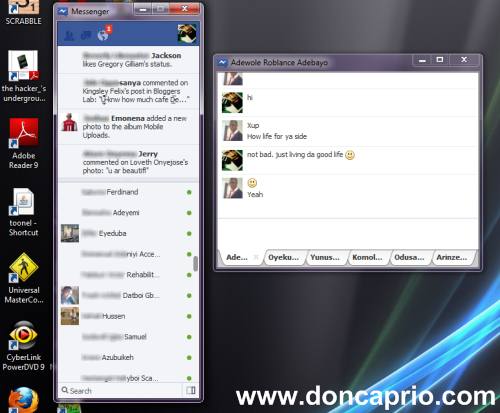
I hardly use facebook chat but recently stumbled across the new facebook chat application that might be useful to our readers who love facebook chat. Facebook recently released  an IM application and I took some time to test run it just to see what it looks like. It’s a stand-alone messenger application but still needs browser support based on my view. It kinda looks ok but there can still be improvements to make it look more like a standard IM application. With this facebook messenger running, you can get notifications and chat with multiple users at the same time. This facebook messenger also has the ticker included so you can still keep a track of your friends activities while on chat.

facebook-messenger-for-windows
Below is a screenshot of what it looks like when in use:
download official facebook chat application messenger for windows

Sunday, 4 December 2011

Posted by Unknown On 03:36
Lots of people upload videos on Facebook daily but you can only play those videos if you have flash player installed, you're not allowed to download them. Sometimes, you probably wish to save some of these videos and watch later but there's no download option on Facebok. There are several ways to download Facebook videos which ranges from using different browser addons to different online services that allows you to freely download Facebook videos. Out of the different methods, I came up with five which I consider the best.


1. Browser Addons


Friday, 2 December 2011

Posted by Unknown On 03:41
It first looked cool and useful when it started out but when it got extremely out of hands, I had to do something. When Facebook introduced smart list, they made it very easy to group your friends according to their importance to you. It also makes it easier to keep track of their facebook activities as you get notified when they post an update or upload a new picture. The downside of the smart list is that you get tons of notifications that's of no use to you. Even without commenting or liking the post, you get notified about it. Sometimes, you have to scroll through all these unwanted notifications just to get stuffs that are important to you and at other times, what you need just get drowned in the pool of these crazy notifications.

Stopping Notifications From Close Friends

-Log in to your facebook account and on the homepage, check the left column

-Scroll down till you see your lists

-Select Close Friends

-On the next page, check the top right corner and click on notifications


Posted by Unknown On 02:14


Tired of like button to each post????

Try this Trick it will help you to like all the post on your home page…..

Its really amazing ……There are 2 methods….


Method :1

1).You should have GOOGLE CHROME (Web browser ) Installed …..
2).You need to install this extension in urgoogle chrome browser -> click here 
3). Please see the Screenshots as shown below….

Friday, 11 November 2011

Posted by Unknown On 04:56
Going back and forth from facebook to google plus sometimes can slow you down especially if you have a lot to do online and would rather have your updates in just one place. Have you ever felt like having all your social networks in just one place? Don't want to switch browser tabs just to see updates? Well, there's no official way to link your facebook and google plus account and merge your updates but Google+Facebook is a browser addon that makes it easy managing your social two favorite social networks right from one place. Google+Facebook adds a facebook tab to your google plus profile. You can check facebook posts and update your status without leaving google plus.


Google+Facebook works both on Firefox and Google Chrome but the developers said they are working on a fix to make it compatible with internet explorer.


Posted by Unknown On 04:48
We all love privacy and you will definitely need lots of that if you use facebook for more personal reasons than just socializing. You can hide your facebook friends list and even new friends you make. This makes the list invisible to your friends and everybody else except you. To hide your facebook friends list from your profile, go to your profile page and follow these steps:

How To Hide Friends List From Profile

-Locate the friends list on the left side bar

-Click on the edit button (pen icon)


Posted by Unknown On 04:42
I was on facebook chat earlier this morning with an old friend whom I haven't seen for quite some time. We were just talking about old times when i replied with a funny smiley and she was like, "how did you do that?" I was a bit surprised she didn't know about how to use smilies on facebook chat and messaging because I assumed everybody did. I couldn't find a better way to reply but to come up with a blog post that gives out a list of smileys/emoticons to use on facebook chat and messaging. The list of smilies given out by facebook is incomplete, they claim they're adding more and you should keep trying out different codes yourself.


Unlike Yahoo messenger and other IM platforms that gives a list of supported smileys, facebook doesn't, they just assume you should know them. Below is a list of facebook emoticons supported at the moment and the codes to make them appear.


Thursday, 10 November 2011

Posted by Unknown On 05:50
Is Your Facebook Friend List decreasing day by day? Want to know who is unfriending you on Facebook? Well, if you have a short list of Facebook friends then it will be easier for you to know who removed you from his/her friends list. But what if you have a very large friend connection list? You can't check it manually going through the long list! Here is a script which will help you know who has unfriended you on Facebook. It works on all major Browsers (Google Chrome, Mozilla Firefox, Opera and Apple Safari). If you're using Mozilla Firefox, then you first need to install GreaseMonkey Plugin from here. Now click on the link given below to install Unfriends Script:

When You click on the link, a script will install. You will see a pop up with text - 'Fetching Script' and after it closes, go to Facebook and sign in. After signing in you'll see a pop up like this:

Posted by Unknown On 05:02
Is the Facebook Interface Boring? Want the Twitter - Like Look In Facebook? Here is a good news for Google Chrome users – now you can make Facebook look like Twitter! Before telling you anything about Facebook Clear, I want you to take a look at this screenshot of Facebook:
fbclear


Friday, 4 November 2011

Posted by Unknown On 07:46
Today everyone is talking about Google Plus. Is Google Plus is better thenFacebook? well it’s depends on you and your circle made in Facebook or Google Plus .
But one thing i know that Google Plus is capturing a market very fast and it’snot good for Mark Zuckerberg(CEO of Facebook) here is one chart
 which is displaying
days to reach 10 Million users for Facebook,Twitter,Google Plus and from this chart you can think that how google plus is taking place of facebook.


Sunday, 30 October 2011

Posted by sanjay On 03:35

Just imagine you have 100+ Facebook friends and you need to invite all of them to your 1st marriage anniversary. It’s very simple, you can just create an event and invite all your friends. But the real problem is, how can you select 1000+ friends? You can go and click on each of your thousand friends & then send them invitations or an easy way is to make use of the following tips. These tips enable you to select all Facebook friends with a single click and invite them to en event, invite them to like your fan page, etc. These are just a few examples of things you can do with this select all option, the possibilities are just endless!

Select All Friends On Facebook

Select All Facebook Friends On Google Chrome

1. Visit the following extension page (Facebook Super Select All).
2. Click on Add to Chrome button at the top of the page.
3. After a few seconds the installation will begin and after it’s done log in to your Facebook account.

Friday, 21 October 2011

Posted by sanjay On 08:41


If you spend a lot of time on facebook then why not spend it more efficiently.There are a lot of browser specific keyboard shortcuts for facebook.You can create new messages,view account settings,View notifications etc .Once you get familiar with these shortcuts you can easily navigate on facebook.In this post I will give the shortcut keys for Google Chrome,Firefox and Internet Explorer.There is also a trick to create custom shortcuts keys for your computer programs.


Here is a comprehensive list of facebook Shortcuts for each browser.

Wednesday, 19 October 2011

Posted by Unknown On 04:44

Facebook is among the  excellent social networking website where you are able to write about your own stories with all your friends, you can share photos,& video.Whereas there are some Facebook users who will share information freely with everyone in their network, there are some other people who would like to keep some details to themselves, including their list of friends.
Many people searching on the net that How to hide friendlist . so i decide to post this article .there are some simple step for hiding friend list.


How to make possible to hide information to any one follow this step.
At first log in to your account and go to Privacy Setting.

Click on it and select Customize. A new window will appear and you can restrict your Facebook friend list visibility only to yourself or even to some specific people.

And now  select “Only Me” to restrict everyone  to see your facebook friends list. and click “Save Setting”

Hope this helps!.

Friday, 7 October 2011

Posted by Unknown On 06:59


Most of us have our profiles on facebook and many of us login into our facebook accounts daily.Aren’t you get bored of same old facebook features.If you want something refreshing then I have a facebook trick for you.By using this simple trick we will change the colour of the facebook.You can select any colour of your choice.


This trick has following Requirements

Posted by Unknown On 06:56

Tagging a person in a picture is very simple and known by most of the people that use facebook but tagging a person or a page in a facebook update is something that many people dont know.Tagging a person in the status update will automatically include a link to the person’s profile with his/her name.Tagging a person in a facebook status update is very simple and it can be done as shown below in the screenshot.
Here is the complete step by step tutorial on How To Tag People In Facebook Status Update

Thursday, 22 September 2011

Posted by Unknown On 08:17
In these few days facebook changed their chatbox. I dont like this new chat box sometimes it irritates me too..


   So  I started  research and made some steps for block the unwanted friends from chatbox yahhhh...