Friday, 30 March 2012

Posted by Unknown On 05:36

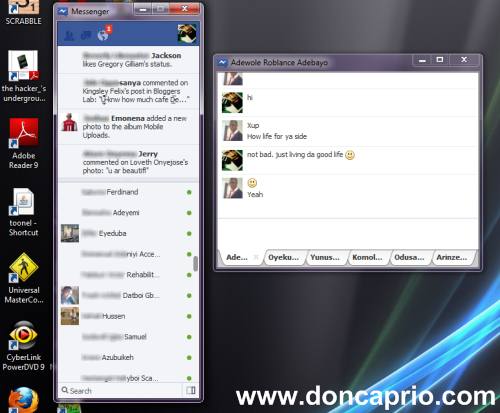
I hardly use facebook chat but recently stumbled across the new facebook chat application that might be useful to our readers who love facebook chat. Facebook recently released  an IM application and I took some time to test run it just to see what it looks like. It’s a stand-alone messenger application but still needs browser support based on my view. It kinda looks ok but there can still be improvements to make it look more like a standard IM application. With this facebook messenger running, you can get notifications and chat with multiple users at the same time. This facebook messenger also has the ticker included so you can still keep a track of your friends activities while on chat.
facebook-messenger-for-windows
Below is a screenshot of what it looks like when in use:
download official facebook chat application messenger for windows
Posted by Unknown On 05:33

It’s been a while since my last post on symbian phone hacking but this time around, I’m bringing something different from mobile stuff. I’m posting a tutorial with detailed screenshots on how you can install, run and switch between multiple operating systems with a software called VirtualBox.
VirtualBox is a powerful x86 and AMD64 / Intel64 virtualization product for enterprise as well as home use. Not only is VirtualBox an extremely feature rich, high performance product for enterprise customers, it is also the only professional solution that is freely available as Open Source Software under the terms of the GNU General Public License (GPL)
Why is virtualization useful?
Although I have dropped the full link for a complete user manual for this software below, I shall however brief you about why this software (VirtualBox) is particularly useful. The techniques and features that VirtualBox provides are useful for several scenarios:
* Running multiple operating systems simultaneously – VirtualBox allows you to run more
than one operating system at a time. This way, you can run software written for one
operating system on another (for example, Windows software on Linux or a Mac) without
having to reboot to use it. Since you can configure what kinds of “virtual” hardware should
be presented to each such operating system, you can install an old operating system such
as DOS or OS/2 even if your real computer’s hardware is no longer supported by that
operating system.
* Easier software installations — Software vendors can use virtual machines to ship entire
software configurations. For example, installing a complete mail server solution on a real
machine can be a tedious task. With VirtualBox, such a complex setup (then often called
an “appliance”) can be packed into a virtual machine. Installing and running a mail server
becomes as easy as importing such an appliance into VirtualBox.
* Testing and disaster recovery. Once installed, a virtual machine and its virtual hard disks
can be considered a “container” that can be arbitrarily frozen, woken up, copied, backed
up, and transported between hosts.
On top of that, with the use of another VirtualBox feature called “snapshots”, one can save
a particular state of a virtual machine and revert back to that state, if necessary. This way,
one can freely experiment with a computing environment. If something goes wrong (e.g.
after installing misbehaving software or infecting the guest with a virus), one can easily
switch back to a previous snapshot and avoid the need of frequent backups and restores.
Any number of snapshots can be created, allowing you to travel back and forward in virtual
machine time. You can delete snapshots while a VM is running to reclaim disk space.
* Infrastructure consolidation – Virtualization can significantly reduce hardware and electricity
costs. Most of the time, computers today only use a fraction of their potential power
and run with low average system loads. A lot of hardware resources as well as electricity
is thereby wasted. So, instead of running many such physical computers that are only partially
used, one can pack many virtual machines onto a few powerful hosts and balance the
loads between them.
What you need to get started
- You need a standard Computer with at least 1gb or ram and 40gb of hard disk although I will advice anybody to use 2GB RAM and anything above 40GB harddisk as the minimum requirements.
- The parent OS must have admin priviledges.
- You need the installation CD for the oerating system you wish to use in your virtual machine
Installation procedures
next
Posted by Unknown On 05:28

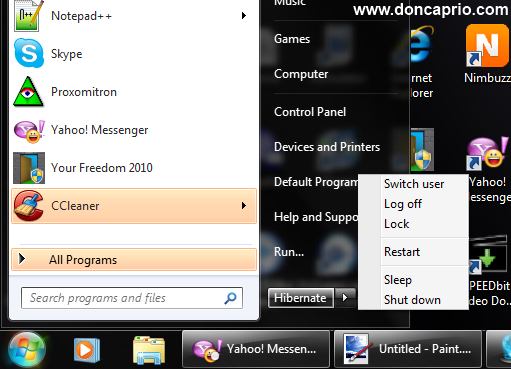
There are lots of people complaining that they have one or two problems with their notebook due to hibernation and that makes one wonder if hibernation actually damages a computer. As a matter of fact, I hate shutting down my laptop because of the time taken to start up and the time taken to restore my browser tabs which may be up to fifteen at times. Hibernating your computer is a very good way to save your work but people often try to convince me that it’s going to damage my motherboard eventually. Is there any truth to this? Is it a practice one should avoid?
First, let me try to tell you what happens when your system goes into hibernation. What most people do not know is that when you hit the hibernation button, your computer actually shuts down but it usually stores a file on your hard disk which is used to restore whatever you’ve been doing.
does hibernation damage your computer?
Posted by Unknown On 05:26

You’ve got a video you need to watch on youtube and it keeps buffering, pausing every few seconds. You feel like just closing the tab because it’s so frustrating but you keep trying because you just have to watch it. This problem often happens when you’re using a slow connection but there’s an easy fix for it which works for me. I’ve been using a broadband connection over the last couple of months but just last weekend, I went out of town and my broadband modem became useless where I was. I had to use a slow dial-up connection and Youtube videos kept buffering for like eternity.
I was able to watch Youtube videos without buffering using a simple trick. Before getting started, you should have Real Player installed on your computer because you’ll be needing this.
- Go to youtube and locate the video you want to watch
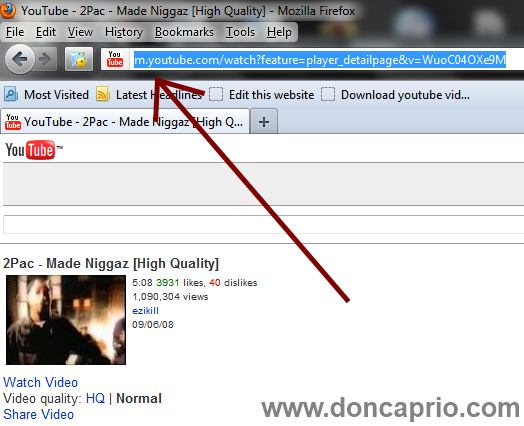
- Check the address bar on your browser and change www to just m as shown below

how to watch youtube videos faster without buffering
Posted by Unknown On 04:07

Welcome again to "HACKING begins - An approach to introduce people with the truth of HACKING".  Today I'll tell you how can you stream live tv on your 2G mobile phone. 
Well you can also try with 3G or Wi fi.  Some time due to media player stream protocol is not user so may be many of you face this problem. 


Hope you like the tutorial ... 

Posted by Unknown On 03:56

Welcome again to "HACKING begins - An approach to introduce people with the truth of HACKING".  Window 7 is a awesome product of Microsoft but the main problem is they are just allow  users to 30 day trail. So guys now i have a good news. You can now activate your Win 7 and make OS Genius. Surprised but it is true. Download Window Loader from below and install it on your Window after 5 minutes your window restart and your Window is fully activated. 

Wednesday, 7 March 2012

Posted by Unknown On 01:56


Welcome to "HACKING begins - An approach to introduce people with the truth of HACKING", Today in this post I'll tell you how can you send fake and anonymous mails to any one. This technique is called E-MAIL FORGING.  E-MAIL FORGING is a art to sending fake emails 
without knowing the password of victim.

WARNING : This article is only for educational purpose don't misuse this. HACKING begins

WWW.HIDEMYASS.BIZ - SEND FAKE E-MAIL is the fabulous online website, used to send fake and anonymous email. All Sent e-mails go to INBOX.